How to Change Your Blibli Tiket PayLater by Indodana Installment Tenure on tiket.com?
If you’ve made a 30-day paylater transaction and want smaller monthly payments, t-mates can now change the installment tenure directly from the tiket.com app using the Tenure Conversion from Indodana. With this feature, you can extend your payment plan to 3, 6, or 12 months. You can start charging the tenure from day-2 after your transaction is made, up until 15 days before the due date.
Things to know before you change the tenure:
- Your account must be active and free from overdue payments.
- Only transactions that haven’t reached their due date are eligible.
- The original tenure must be 30 days and can be changed to 3 months (min. transaction IDR 300.000), 6 months or 12 months (min. transaction IDR 500.000)
- Transactions such as cash loans, add-ons, partially paid transactions, or those that have been restructured are not eligible for tenure conversion.
- Your new due date will be set to +1 month from the date you apply for the tenure change.
- There’s no admin fee for requesting a tenure conversion, but interest and applicable admin fees will be charged based on the new tenure you choose.
How to change your installment tenure:
- Open the tiket.com app and go to the Blibli Tiket PayLater by Indodana Finance section.
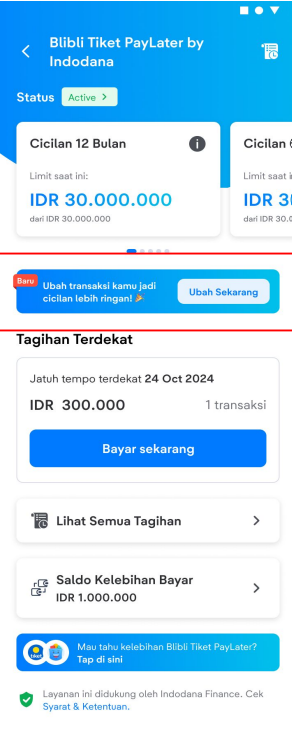
- Tap the Ubah Tenor button.
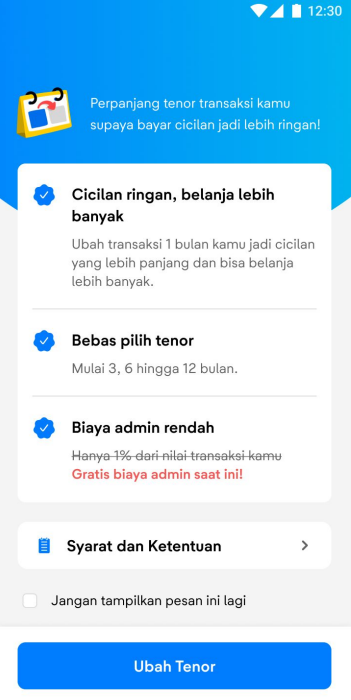
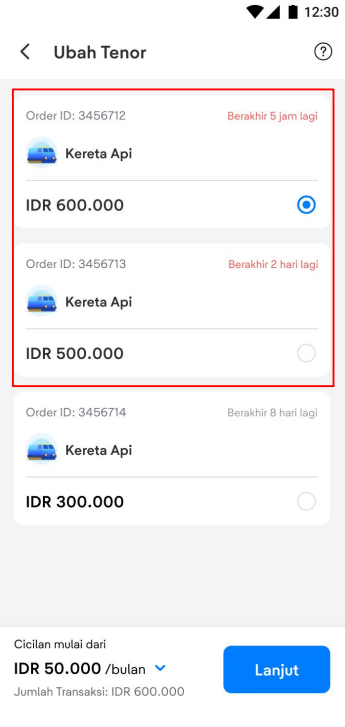
- Choose the transaction you want to modify.
- Select your new installment plan (3, 6, or 12 months).
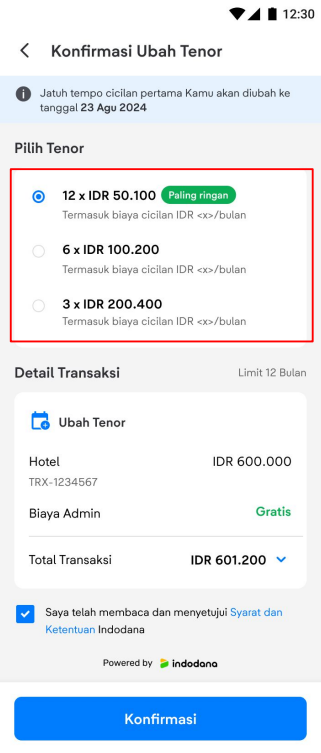
- Review the details and tap Confirm.
- Done! Your tenure has been successfully changed and you’ll receive a confirmation email from tiket.com.
You’ll also receive reminder emails from Indodana to make sure you don’t miss the opportunity to convert your installment tenure, starting with an initial info email on day 1 after your transaction, a follow-up reminder on day 7, and a final notification 15 days before your due date. This gives you plenty of time to review your options and make a decision.
If you have any questions or run into issues, feel free to contact Indodana Customer Care at (021) 4059 5888 or email cs@indodanafinance.com.