



2 Star Hotels in Bankstown - North-West

Special offers for you









1/10
Showing 2 hotels in Bankstown - North-West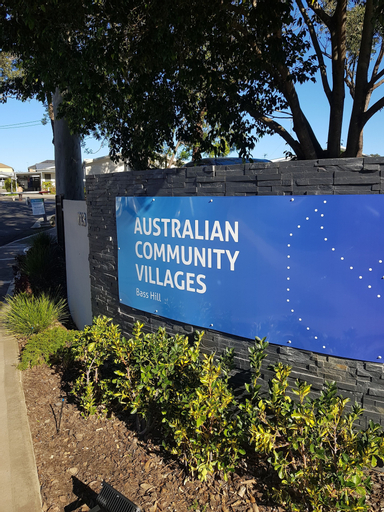
Australian Community Villages
Australian Community Villages Location
With a stay at Australian Community Villages in Sydney (Bass Hill), you'll be within a 15-minute drive of Afterpay Arena and Accor Stadium. This cabin is 13.8 mi (22.2 km) from Star Casino and 14.1 mi (22.7 km) from International Convention Centre Sydney.
Australian Community Villages Facility and Service
Take in the views from a garden and make use of amenities such as barbecue grills.
Australian Community Villages Rooms
Make yourself at home in one of the 24 air-conditioned rooms featuring kitchenettes. Conveniences include desks and microwaves.
See detailsWith a stay at Australian Community Villages in Sydney (Bass Hill), you'll be within a 15-minute drive of Afterpay Arena and Accor Stadium. This cabin is 13.8 mi (22.2 km) from Star Casino and 14.1 mi (22.7 km) from International Convention Centre Sydney.
Australian Community Villages Facility and Service
Take in the views from a garden and make use of amenities such as barbecue grills.
Australian Community Villages Rooms
Make yourself at home in one of the 24 air-conditioned rooms featuring kitchenettes. Conveniences include desks and microwaves.
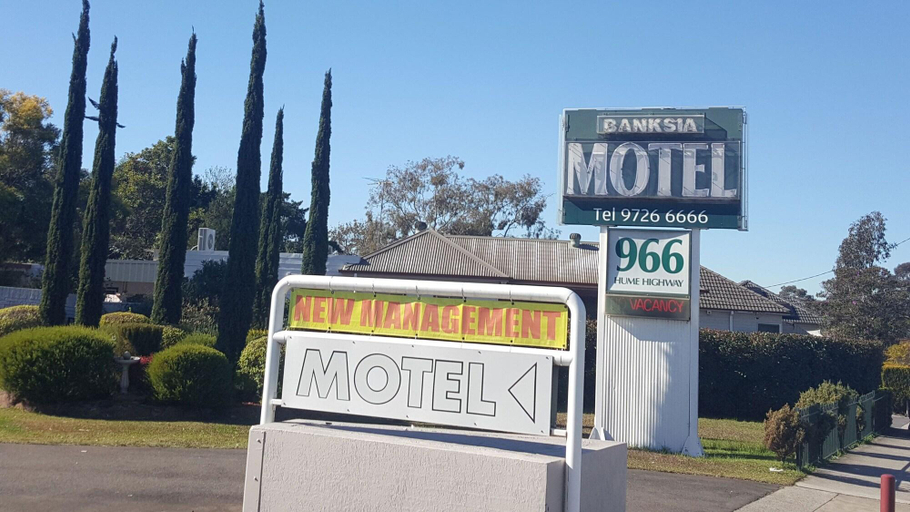
Banksia Motel Bass Hill
Banksia Motel Bass Hill Location
With a stay at Banksia Motel Bass Hill in Sydney (Bass Hill), you'll be within a 15-minute drive of Afterpay Arena and Accor Stadium. This motel is 15.9 mi (25.5 km) from Star Casino and 16.2 mi (26 km) from International Convention Centre Sydney.
Banksia Motel Bass Hill Rooms
Make yourself at home in one of the 38 air-conditioned rooms featuring refrigerators and minibars. Complimentary wireless internet access keeps you connected, and digital programming is available for your entertainment. Bathrooms with showers are provided. Housekeeping is provided daily, and irons/ironing boards can be requested.
Important Information
This property is closed from May 30 2026 to January 31 2027 (dates subject to change).
See detailsWith a stay at Banksia Motel Bass Hill in Sydney (Bass Hill), you'll be within a 15-minute drive of Afterpay Arena and Accor Stadium. This motel is 15.9 mi (25.5 km) from Star Casino and 16.2 mi (26 km) from International Convention Centre Sydney.
Banksia Motel Bass Hill Rooms
Make yourself at home in one of the 38 air-conditioned rooms featuring refrigerators and minibars. Complimentary wireless internet access keeps you connected, and digital programming is available for your entertainment. Bathrooms with showers are provided. Housekeeping is provided daily, and irons/ironing boards can be requested.
Important Information
This property is closed from May 30 2026 to January 31 2027 (dates subject to change).

How to Book Hotels on tiket.com
1. Find the hotelEnter the name of the city, area, or hotel to find the place you want.
2. Select a roomOn the hotel detail page, you will see the available room options. Select a room that suits your needs.
3. Complete the booking detailsInput the contact details (the person who will be contacted by tiket.com and the hotel about the booking) and the guests’ details.
4. Select Add-onsYou can also buy additional services such as meal packages, transportation, and many more.
5. Pay your bookingSelect the payment method and complete your transaction. Don’t forget to use the promo code to get a cheaper hotel price at tiket.com.
6. Get the reservation e-voucherAfter the payment is successful, the e-voucher will be available on the Your Orders menu and sent to the email listed in the contact details.