



Hotels in Kapasa

Special offers for you








1/10
Showing 152 hotels in Kapasa
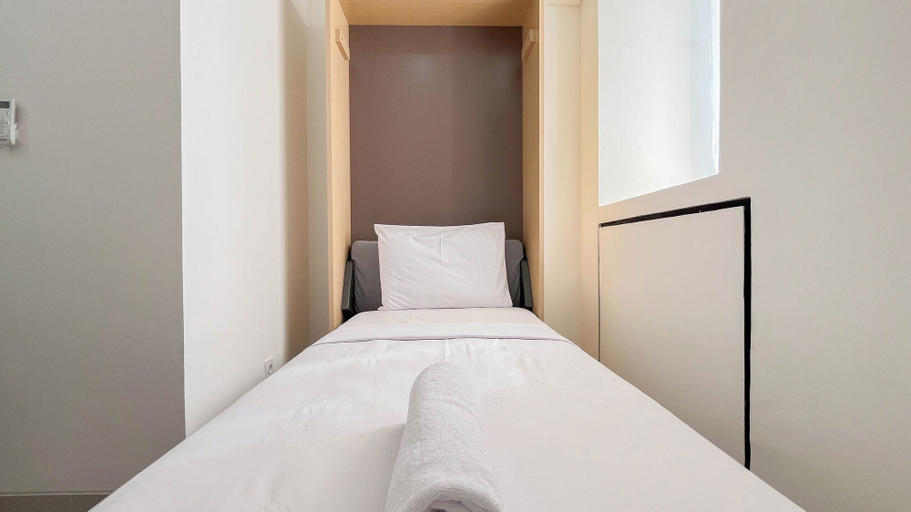
Warm Comfy Studio No Kitchen Bandaraya By Travelio
Crafted for coziness, every guestroom provides an array of features, guaranteeing a tranquil night's sleep while maintaining the level of comfort.For an elevated experience at apartment, select rooms are equipped with linen service to improve your stay. Expand your in-room entertainment choices with various amenities, such as television offered in certain accommodations. In select rooms, the apartment offers visitors access to a refrigerator. Maintain your cleanliness and comfort using toiletries and towels available in select guest restrooms.
See detailsGood Price Studio (No Kitchen) At Apartment Bandaraya - Tallasa City Makassar
Good Price Studio (No Kitchen) At Apartment Bandaraya - Tallasa City Makassar Location
Located in Makassar, this apartment is a 5-minute drive from Universitas Hasanuddin and 10 minutes from Mall Panakkukang. This apartment is 7.9 mi (12.7 km) from Monumen Mandala and 8.1 mi (13 km) from Paotere Harbor.
Good Price Studio (No Kitchen) At Apartment Bandaraya - Tallasa City Makassar Rooms
Make yourself comfortable in this air-conditioned apartment, which has a kitchen. Conveniences include a microwave and a rice cooker.
See detailsLocated in Makassar, this apartment is a 5-minute drive from Universitas Hasanuddin and 10 minutes from Mall Panakkukang. This apartment is 7.9 mi (12.7 km) from Monumen Mandala and 8.1 mi (13 km) from Paotere Harbor.
Good Price Studio (No Kitchen) At Apartment Bandaraya - Tallasa City Makassar Rooms
Make yourself comfortable in this air-conditioned apartment, which has a kitchen. Conveniences include a microwave and a rice cooker.
Hotels in Kapasa
Don't feel hesitant to book hotels in Kapasa at tiket.com! We'll make sure to provide all conveniences you need when doing a room reservation. Book your favourite hotel now only at tiket.com!

How to Book Hotels on tiket.com
1. Find the hotelEnter the name of the city, area, or hotel to find the place you want.
2. Select a roomOn the hotel detail page, you will see the available room options. Select a room that suits your needs.
3. Complete the booking detailsInput the contact details (the person who will be contacted by tiket.com and the hotel about the booking) and the guests’ details.
4. Select Add-onsYou can also buy additional services such as meal packages, transportation, and many more.
5. Pay your bookingSelect the payment method and complete your transaction. Don’t forget to use the promo code to get a cheaper hotel price at tiket.com.
6. Get the reservation e-voucherAfter the payment is successful, the e-voucher will be available on the Your Orders menu and sent to the email listed in the contact details.