



Hotels in San Nazzaro
Showing 6 hotels in San Nazzaro


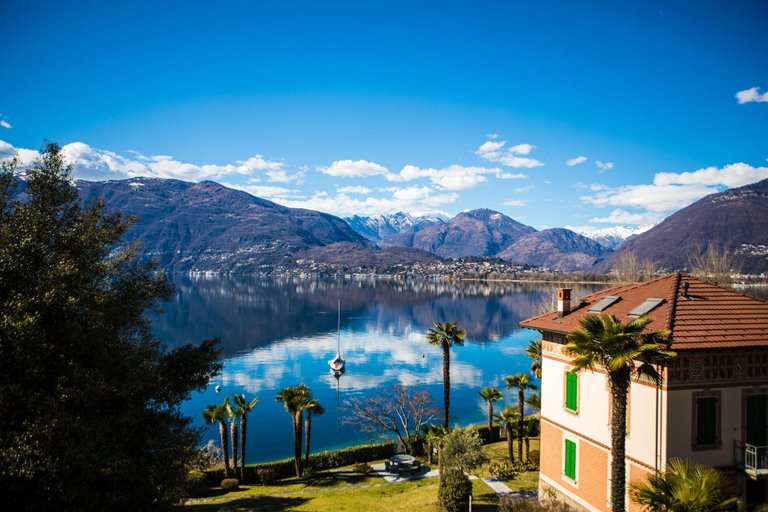
Ferienwohnung mit fantastischem Panoramablick
Apartment Residenza Miralago Apt- A4 by Interhome
Casa Chimp 1 Holiday Apartment
Boutique Hotel Villa Sarnia
Boutique Hotel Villa Sarnia Location
With a stay at Boutique Hotel Villa Sarnia in Gambarogno, you'll be within a 10-minute drive of Gambarogno Botanic Garden and Casa Ghisler. This hotel is 19 mi (30.6 km) from Lake Lugano and 3.2 mi (5.1 km) from Bolle di Magadino.
Boutique Hotel Villa Sarnia Facility and Service
Take in the views from a garden and make use of amenities such as complimentary wireless internet access.
Boutique Hotel Villa Sarnia Rooms
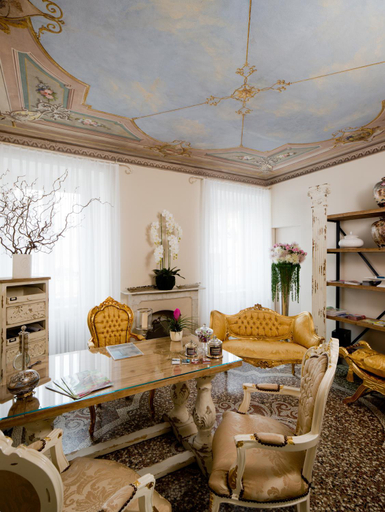
Make yourself at home in one of the 6 individually decorated guestrooms, featuring minibars and espresso makers. 27-inch flat-screen televisions with cable programming provide entertainment, while complimentary wireless internet access keeps you connected. Bathrooms feature showers, complimentary toiletries, and hair dryers. Conveniences include safes and desks, and housekeeping is provided daily.
Restaurant and Cafe
Buffet breakfasts are available daily from 8:00 AM to 10:00 AM for a fee.
See detailsWith a stay at Boutique Hotel Villa Sarnia in Gambarogno, you'll be within a 10-minute drive of Gambarogno Botanic Garden and Casa Ghisler. This hotel is 19 mi (30.6 km) from Lake Lugano and 3.2 mi (5.1 km) from Bolle di Magadino.
Boutique Hotel Villa Sarnia Facility and Service
Take in the views from a garden and make use of amenities such as complimentary wireless internet access.
Boutique Hotel Villa Sarnia Rooms
Make yourself at home in one of the 6 individually decorated guestrooms, featuring minibars and espresso makers. 27-inch flat-screen televisions with cable programming provide entertainment, while complimentary wireless internet access keeps you connected. Bathrooms feature showers, complimentary toiletries, and hair dryers. Conveniences include safes and desks, and housekeeping is provided daily.
Restaurant and Cafe
Buffet breakfasts are available daily from 8:00 AM to 10:00 AM for a fee.
La Campagnola Studios
Located in Locarno, La Campagnola Studios offers accommodation with easy access to Locarno’s best spots. The property features swimming pool, WiFi, and parking.
The rooms feature (a) TV, refrigerator, and coffee tea maker. The en suite bathroom comes with (a) shower, free toiletries, and hair dryer.
The property offers hotel safe and children playground. Other facilities include luggage storage, tours/ticket assistance, and tours.
See detailsVilla Sarnia
Clients will enjoy a peaceful and calm stay at Villa Sarnia as it counts with a total of 6 units. Moreover, there is a wireless Internet connection at hand in communal areas. The reception desk is not open throughout the day. A fee may be chargeable for some services.
See detailsHotels in San Nazzaro
Don't feel hesitant to book hotels in San Nazzaro at tiket.com! We'll make sure to provide all conveniences you need when doing a room reservation. Book your favourite hotel now only at tiket.com!

How to Book Hotels on tiket.com
1. Find the hotelEnter the name of the city, area, or hotel to find the place you want.
2. Select a roomOn the hotel detail page, you will see the available room options. Select a room that suits your needs.
3. Complete the booking detailsInput the contact details (the person who will be contacted by tiket.com and the hotel about the booking) and the guests’ details.
4. Select Add-onsYou can also buy additional services such as meal packages, transportation, and many more.
5. Pay your bookingSelect the payment method and complete your transaction. Don’t forget to use the promo code to get a cheaper hotel price at tiket.com.
6. Get the reservation e-voucherAfter the payment is successful, the e-voucher will be available on the Your Orders menu and sent to the email listed in the contact details.