



Hotels in São Cristóvão
Showing 2 hotels in São Cristóvão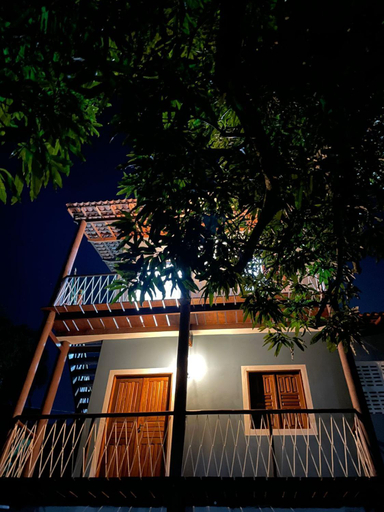

Vila Mares
Grand' Hostel
Grand' Hostel Location
With a stay at Grand' Hostel in Sao Cristovao, you'll be within a 5-minute walk of São Francisco Square and Nossa Senhora da Vitoria Church. This hostel is 13.8 mi (22.2 km) from Orla de Atalaia and 0.2 mi (0.3 km) from N. S. do Amparo Church.
Grand' Hostel Rooms
Make yourself at home in one of the 5 air-conditioned rooms featuring minibars. Complimentary wireless internet access is available to keep you connected.
Restaurant and Cafe
Enjoy a meal at são francisco café e bar or snacks in the hostel's coffee shop/cafe. A complimentary buffet breakfast is served daily from 7:30 AM to 10:00 AM.
See detailsWith a stay at Grand' Hostel in Sao Cristovao, you'll be within a 5-minute walk of São Francisco Square and Nossa Senhora da Vitoria Church. This hostel is 13.8 mi (22.2 km) from Orla de Atalaia and 0.2 mi (0.3 km) from N. S. do Amparo Church.
Grand' Hostel Rooms
Make yourself at home in one of the 5 air-conditioned rooms featuring minibars. Complimentary wireless internet access is available to keep you connected.
Restaurant and Cafe
Enjoy a meal at são francisco café e bar or snacks in the hostel's coffee shop/cafe. A complimentary buffet breakfast is served daily from 7:30 AM to 10:00 AM.
Hotels in São Cristóvão
Don't feel hesitant to book hotels in São Cristóvão at tiket.com! We'll make sure to provide all conveniences you need when doing a room reservation. Book your favourite hotel now only at tiket.com!

How to Book Hotels on tiket.com
1. Find the hotelEnter the name of the city, area, or hotel to find the place you want.
2. Select a roomOn the hotel detail page, you will see the available room options. Select a room that suits your needs.
3. Complete the booking detailsInput the contact details (the person who will be contacted by tiket.com and the hotel about the booking) and the guests’ details.
4. Select Add-onsYou can also buy additional services such as meal packages, transportation, and many more.
5. Pay your bookingSelect the payment method and complete your transaction. Don’t forget to use the promo code to get a cheaper hotel price at tiket.com.
6. Get the reservation e-voucherAfter the payment is successful, the e-voucher will be available on the Your Orders menu and sent to the email listed in the contact details.