



2 Star Hotels in Saharsa
Showing 2 hotels in Saharsa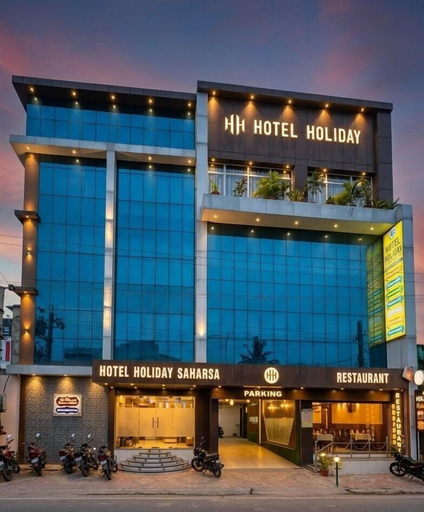

Hotel Holiday Saharsa
Hotel Holiday Saharsa Location
Hotel Holiday Saharsa is located in Saharsa.
Hotel Holiday Saharsa Facility and Service
Take in the views from a garden and make use of amenities such as complimentary wireless internet access.
Hotel Holiday Saharsa Rooms
Make yourself at home in one of the 79 guestrooms. Complimentary wireless internet access is available to keep you connected.
See detailsHotel Holiday Saharsa is located in Saharsa.
Hotel Holiday Saharsa Facility and Service
Take in the views from a garden and make use of amenities such as complimentary wireless internet access.
Hotel Holiday Saharsa Rooms
Make yourself at home in one of the 79 guestrooms. Complimentary wireless internet access is available to keep you connected.
Rainbow Resort
Experience an abundance of unparalleled facilities and features at Rainbow Resort.Discovering Madhepura becomes even more accessible, thanks to the shuttle amenities provided at the home. For visitors traveling by automobile, complimentary parking is available. Reception assistance is offered at the home featuring luggage storage.For extended visits or whenever required, the laundry service ensures your preferred travel garments remain fresh and accessible. During leisurely days and evenings, on-site amenities such as 24-hour room service enable you to fully enjoy your accommodation.At Rainbow Resort, every guestroom is provided with convenient amenities and fittings to ensure a comfortable stay.Elevate your experience at home with the knowledge that certain rooms are equipped with air conditioning, ensuring a more pleasant stay for you. Certain rooms offer in-room amusement features such as the television for your enjoyment. At the home, an assortment of easily accessible and delicious meal choices are available to satisfy your appetite whenever it strikes.
See detailsFAQ about Hotels in Saharsa

How to Book Hotels on tiket.com
1. Find the hotelEnter the name of the city, area, or hotel to find the place you want.
2. Select a roomOn the hotel detail page, you will see the available room options. Select a room that suits your needs.
3. Complete the booking detailsInput the contact details (the person who will be contacted by tiket.com and the hotel about the booking) and the guests’ details.
4. Select Add-onsYou can also buy additional services such as meal packages, transportation, and many more.
5. Pay your bookingSelect the payment method and complete your transaction. Don’t forget to use the promo code to get a cheaper hotel price at tiket.com.
6. Get the reservation e-voucherAfter the payment is successful, the e-voucher will be available on the Your Orders menu and sent to the email listed in the contact details.