



Hotel di Solok Selatan

Penawaran menarik buatmu




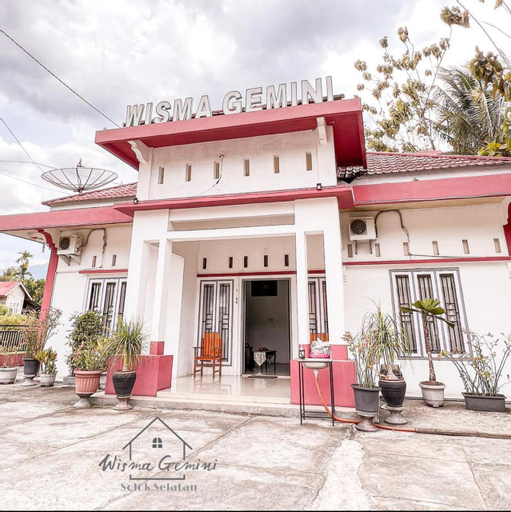
WISMA GEMINI
Homestay 007 Saribu Rumah Gadang
Homestay 007 Saribu Rumah Gadang menawarkan akomodasi di Solok Selatan dan berjarak sejauh 106 km atau sekitar 4 jam perjalanan dari kota Padang, Sumatera Barat. Dapatkan sensasi menginap klasik zaman dulu di Rumah Gadang dengan keaslian ranah Minang.
Setiap kamar dilengkapi dengan akses WiFi gratis. Tamu dapat menikmati makanan khas asli Solok Selatan yaitu pangek pisang. Tamu juga bisa request rendang ke pemilik Homestay.
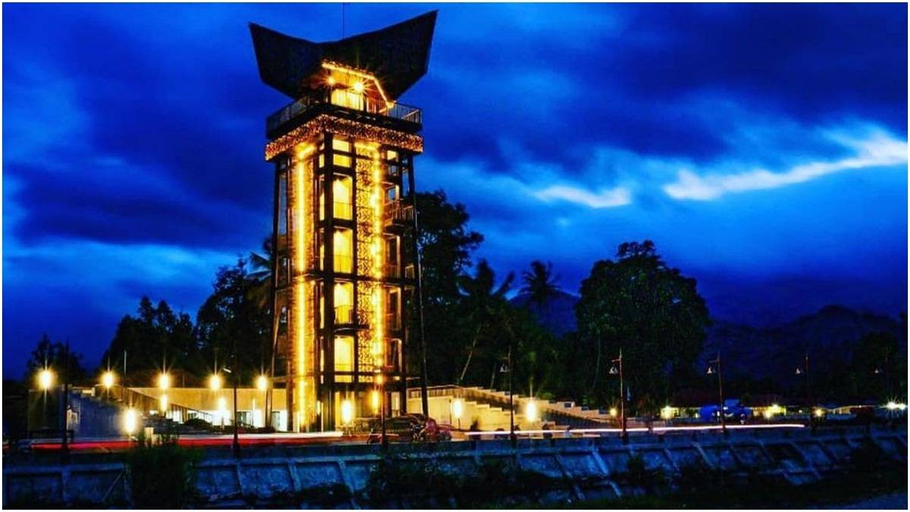
Fasilitas lain yang tersedia di Homestay 007 Saribu Rumah Gadang adalah parkir gratis. Selain itu, tamu juga dapat melihat pemandangan gonjong (atap runcing) dari Menara Songket yang bisa ditempuh hanya dengan jalan kaki saja dari lokasi penginapan. Cocok untuk keluarga dan komunitas pencinta adat, budaya, dan alam.
Hotel Murah di Solok Selatan
Sobat Tiket, apakah kamu tahu kota yang dipenuhi rumah gadang berusia ratusan tahun? Kalau kamu penasaran, langsung saja singgah ke Solok Selatan. Kabupaten di bagian timur Provinsi Sumatera Barat ini sangat khas dengan kekayaan budaya dan sejarahnya. Mulai dari istana, monumen, hingga Kawasan Seribu Rumah Gadang berusia lebih dari satu abad ada di sini. Tak heran, kabupaten ini dijuluki Nagari Seribu Rumah Gadang. Yang paling terkenal adalah Rumah Gadang 21, yaitu rumah gadang dengan 21 ruangan dan 18 gonjong. Menariknya lagi, kamu tidak hanya bisa berwisata sejarah, tetapi juga memanjakan diri dengan objek wisata alam yang menyegarkan. Ada Danau Bontak, Puncak Camintoran, Air Terjun Tansi Ampek, serta keindahan kaki pegunungan Bukit Barisan. Di sini juga terdapat banyak sungai loh.
Solok Selatan adalah sebuah daerah di Provinsi Sumatera Barat. Daerah ini memiliki topografi yang menarik karena sebagian berada di kaki pegunungan Bukit Barisan dan sisanya merupakan dataran rendah hingga ujung timurnya. Ini membuat Solok Selatan punya potensi wisata alam yang menarik. Selain itu, daerah ini juga memiliki kekayaan budaya dan sejarah. Sobat tiket bisa dengan mudah menemukan Rumah Gadang (rumah adat Minang) di Solok Selatan.
Bukan hanya kaya akan potensi wisata alam, Solok Selatan juga kaya akan wisata budaya dan sejarah. Oleh karenanya, waktu satu hari saja jelas kurang untuk menjelajahi seluruh objek wisata yang ada. Daripada menyesal karena belum puas menikmati keindahan alam dan budaya Solok Selatan, ada baiknya sobat tiket memesan hotel.
Penginapan dan hotel di Solok Selatan bisa kamu pesan dengan mudah melalui aplikasi tiket.com. Dari tiket.com, kamu bisa melihat fasilitas yang ditawarkan hingga beragam promo menarik. Sobat tiket juga bisa mengintip akomodasi di daerah lain, misalnya hotel di Sumatera Barat yang bisa dituju setelah petualangan di Solok Selatan berakhir.
Sekilas tentang Solok Selatan
Kabupaten Solok Selatan memang belum lama terbentuk. Daerah ini dimekarkan dari Kabupaten Solok pada tahun 2004 lalu. Namun, wacana pembentukannya telah muncul sejak awal kemerdekaan, sekitar tahun 1950-an. Daerah ini dikenal sebagai Kota Seribu Gadang karena memang memiliki banyak sekali Rumah Gadang. Bahkan, beberapa di antaranya sudah berusia ratusan tahun.
Daerah ini juga bisa dibilang sebagai saksi sejarah perjuangan bangsa Indonesia melawan Belanda. Di sini terdapat Tugu Rumah PDRI (Pemerintah Darurat Republik Indonesia) atau disebut Rumah Jama. Tugu yang berada di Nagari Bidar Alam ini dibangun untuk mengenang perjuangan Pemerintah Darurat pada sekitar tahun 1949.
Ada beberapa penginapan dan hotel di Solok Selatan yang bisa kamu singgahi selama berlibur di sini. Ini dia rekomendasi dari kami. Check it out!
Hotel Terbaik di Solok Selatan
Kalau kamu ingin tinggal di penginapan terbaik, Solok Selatan punya beberapa rekomendasi hotel yang bisa kamu coba, di antaranya:
- Wisma Sakinah – Berlokasi 1 km dari Nagari Saribu Rumah Gadang, hotel di Solok Selatan yang satu ini begitu mudah ditemukan. Menyediakan kamar yang nyaman dengan nuansa homey dan sudah dilengkapi dengan TV serta kamar mandi ber-shower;
- Homestay 007 Saribu Rumah Gadang – Menginap di sini mengajak sobat tiket untuk merasakan tinggal di dalam Rumah Gadang. Telah dilengkapi dengan fasilitas resepsionis serta akses WiFi. Tamu juga akan mendapat suguhan khas Solok Selatan;
- RedDoorz Syariah near Hot Water Boom Solok Selatan – Merupakan sebuah hotel di Solok Selatan yang menawarkan kamar-kamar nyaman dengan fasilitas lengkap. Layanan resepsionis tersedia 24 jam untuk memenuhi kebutuhan para tamu.
Hotel Murah di Solok Selatan
Kalau ingin hemat budget, sobat tiket juga bisa memesan beberapa penginapan berikut saat ada promo atau penawaran menarik dari tiket.com supaya lebih murah.
- Rita Homestay – Hotel budget yang satu ini bisa untuk solo traveler maupun rombongan keluarga. Kamar-kamar yang disediakan telah dilengkapi dengan tempat tidur nyaman dan rak pakaian;
- RedDoorz Syariah near Kawasan Saribu Rumah Gadang Solok Selatan – Penginapan yang satu ini menyediakan tempat parkir gratis serta akses WiFi gratis selama tamu menginap. Unit kamar yang disediakan dilengkapi dengan AC. Bisa kamu pesan mulai dari harga Rp100 ribuan.
Jangan lupa gunakan aplikasi tiket.com untuk memesan hotel di Solok Selatan. Bukan cuma booking hotel, kamu juga bisa dapatkan berbagai penawaran menarik sehingga liburan pun makin hemat. Yuk, booking hotel di Solok Selatan dengan promo murah, cepat, dan mudah di tiket.com!
Berada di kaki pegunungan Bukit Barisan, Solok Selatan punya potensi wisata alam yang begitu besar. Kabupaten ini memiliki objek wisata Puncak Camintoran di Kecamatan Sangir. Objek wisata yang satu ini menyuguhkan pemandangan spektakuler bak negeri di atas awan. Saat berkunjung, pastikan kamu memakai pakaian hangat karena suhunya bisa mencapai 10 derajat Celcius.
Masih berada di kawasan yang sama, ada Air Terjun Tansi Ampek. Wisata alam yang satu ini menyajikan air terjun dua tingkat nan cantik. Perjalanan menuju air terjun pun diwarnai dengan pemandangan kebun teh kaki Gunung Kerinci yang begitu memanjakan mata. Selain wisata alam, Solok Selatan juga kaya akan wisata budaya, seperti Kawasan Nagari Saribu Rumah Gadang yang berisi kurang lebih 174 buah Rumah Gadang yang sudah berusia puluhan tahun. Biar dekat dengan lokasi wisata tersebut, kamu bisa menginap di Wisma Sakinah.
Rumah Gadang 21
Rumah Gadang terpanjang ini terletak di Kecamatan Sangir Batanghari. Terdiri dari 21 ruangan dan 18 tonjong. Panjangnya melebihi lapangan sepak bola. Makanya Sobat tiket, rumah gadang ini disebut layak masuk rekor MURI sebagai rumah adat terpanjang.
Rumah Gadang 21 merupakan warisan turun-temurun dari suku Melayu Sigintir. Pemiliknya ialah Datuk Simajolelo. Rumah Gadang 21 disebut masih memiliki keterkaitan sejarah dengan rumah gadang suku Melayu di Muara Labuh. Pembangunannya dilakukan bergotong royong di bawah pimpinan niniak mamak. Tadinya, Rumah Gadang 21 dihuni oleh pemiliknya. Tapi sekarang, hanya dipakai untuk upacara-upacara tertentu saja. Mulai dari upacara adat, pesta perkawinan maupun upacara persemayaman keturunan dari pemiliknya.
Kawasan Seribu Rumah Gadang
Dengan menempuh perjalanan sekitar empat jam dari Kota Padang, kamu akan sampai di kawasan ini, yaitu di Nagari Koto Baru, Kecamatan Sungai Pagu. Kawasan ini menyajikan hamparan rumah tradisional Minangkabau dalam berbagai jenis dan ukuran. Karenanya, pernah digunakan sebagai lokasi syuting sejumlah film. Bahkan, pada tahun 2017 lalu kawasan ini mendapat predikat Kampung Adat Terpopuler di Indonesia dalam Anugerah Pesona Indonesia (API).
Pencetus nama Kawasan Seribu Rumah Gadang adalah Meutia Farida Hatta Swasono, Menteri Negara Pemberdayaan Perempuan, saat berkunjung pada tahun 2008 lalu. Jejeran sekitar 174 rumah gadang dengan berbagai bentuk memang akan menyita perhatian setiap pengunjung. Apalagi rumah-rumah itu terawat dengan baik karena masih dihuni. Tak ayal, Bu Menteri menjulukinya demikian.
Tugu Rumah PDRI
Sobat tiket, apakah kamu tahu bahwa Indonesia pernah melewati masa-masa genting dan memindahkan pemerintahan darurat ke Sumatera Barat? Nah, Tugu Rumah PDRI (Pemerintah Darurat Republik Indonesia) atau disebut Rumah Jama inilah yang jadi saksi peristiwa tersebut. Saat itu, Rumah Jama dijadikan pos keamanan. Bahkan, sidang-sidang Kabinet PDRI pada tahun 1949 dilangsungkan di sini. Kalau kamu penasaran dengan wisata sejarah seperti ini, kamu bisa mampir. Lokasinya ada di Nagari Bidar Alam.
Puncak Camintoran
Puncak yang menyediakan pemandangan negeri di atas awan ini berada di kaki Gunung Kerinci. Tepatnya di Golden Arm, Nagari Lubuk Gadang, Kecamatan Sangir. Udara dingin dengan suhu sekitar 10 hingga 12 derajat menjadi ciri khasnya. Makanya kalau kamu mau ke sini, jangan lupa siapkan jaket dan baju hangatmu. Oh iya, kamu juga bisa menikmati nuansa perkemahan di lokasi ini.
Untuk kamu yang suka foto-foto, destinasi ini harus ada dalam list kamu karena banyak sekali sudut yang bisa kamu jadikan latar fotomu. Ada ayunan, hamparan bunga, nuansa alam dengan mentari pagi, dan masih banyak lagi.
Air Terjun Tansi Ampek
Air terjun dua tingkat ini terletak di jorong Sungai Lambai, Kenagarian Lubuak Gadang, Kecamatan Sangir. Tingkat pertama berada di ketinggian sekitar 15 meter, sedangkan yang kedua sekitar 10 meter. Untuk sampai ke lokasi air terjun, kamu bisa memanjakan matamu dengan melewati perkebunan teh Mitra Kerinci yang segar.
Pada akhir tahun 2009, pegiat olahraga kayak asal Afrika Selatan melakukan penerjunan di sini. Air terjun ini memang dikenal memiliki arus deras dengan kualitas kelas dunia yang membuatnya dilirik pegiat olahraga ekstrem internasional.
Berkunjung ke suatu tempat baru, tentu nggak akan lengkap tanpa mencicipi kulinernya. Solok Selatan punya beberapa kuliner khas yang bukan cuma unik, tapi juga lezat. Ada hidangan pangek pisang. Biasanya, olahan pisang memiliki cita rasa yang manis, tapi hidangan yang satu ini justru terasa gurih karena dibumbui dengan santan dan rempah-rempah. Biar makin sedap, nikmati pangek pisang dengan ketan puluik. Untuk makanan manisnya, ada limpiang pinyaram yang mirip kue cucur. Rasanya yang manis legit cocok dinikmati dengan secangkir kopi hangat di sore hari.
Cara Menuju ke Solok Selatan
Untuk sampai ke Solok Selatan, kamu bisa melakukan perjalanan dengan berbagai kendaraan. Kamu bisa naik pesawat ke Bandara Internasional Minangkabau, Padang, lalu melanjutkan perjalanan dengan kendaraan roda empat maupun roda dua. Atau bisa juga dari Bandara Sultan Thaha Syaifuddin, Jambi. Yang pasti, kamu bisa membeli semua tiketmu di aplikasi tiket.com. secara online. Dengan tiket.com, mau kemana? semua ada tiketnya!
